SiteKey › Industries › Farms and orchards › Farm SiteKey and the dairy biosecurity plan
Dairy farms

Farm SiteKey for dairy farms with your biosecurity plan included

Farm SiteKey runs sign in at your farm gates and keeps your dairy biosecurity plan in the same place. You can also buy the plan course without Farm SiteKey.

Sign up your farm Compare the two options

Buy the plan, or get it with Farm SiteKey

The dairy biosecurity plan course is $150 plus GST. Farm SiteKey is $30 a month plus GST with a five month minimum and includes the same course.

The plan course

$150 plus GST, paid once

  • The dairy biosecurity plan course, worked through for your own property
  • Your finished plan emailed to you as a PDF
  • Press Update my plan after any change and the new version is emailed to you
Buy the plan

Farm SiteKey, plan included

$30 a month plus GST, 5 month minimum

  • The same plan course at no extra cost, on the same login as your farm
  • QR sign in at every gate, on the person's own phone with no app
  • A printable gate sign with your hazards, site rules, contacts and Emergency 111
  • Contractor bookings, team meetings, incidents and near misses, and an evacuation list
Sign up your farm

Five months of Farm SiteKey costs $150 plus GST, the same as the plan course. You save a card when you sign up and nothing is charged until we approve your farm. If you cancel before five months, you pay the rest of the five months.

What goes in your plan

The course takes you through your own farm a section at a time. Each section fills a page of the plan.

  1. Your propertyWho you are, what you produce, and who wrote the plan.
  2. Your mapYour gates, parking and wash bay marked on the map.
  3. What arrives and what leavesStock, feed, gear and the jobs that move them.
  4. How things get in and outHow each of those could bring something in or take it away.
  5. Rating the risksHow often each one happens on your farm, what it would cost, and what you sort out first.
  6. Your goalsOne goal for each risk you put first, and how you will know it was done.
  7. Who does whatWho does each job, how often, and what you have agreed with people who do not work for you.
  8. Four weeks laterYou come back, record what you actually saw, and change what did not work. That is version 2.

What Farm SiteKey does on your farm

You sign up, we approve the farm, and you get a login, a QR sign for each gate and the plan course. Press the dots on the photo to see what happens at the gate.
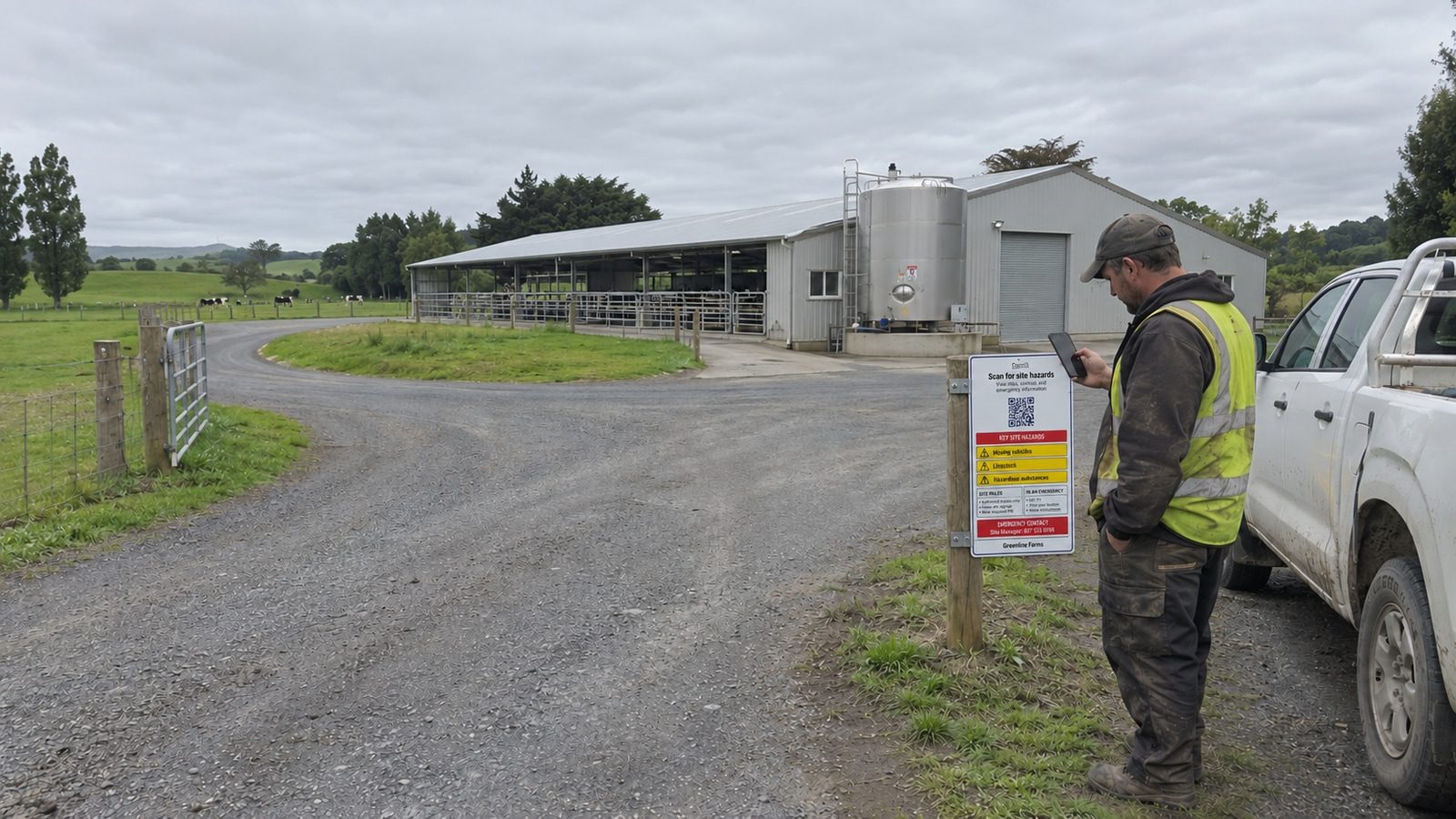
A contractor in a high visibility vest scans the Farm SiteKey sign on a post at a dairy farm entrance, with the milking shed, the milk vat, cows in the paddock and his ute behind him

Swipe the photo sideways to see all the dots.

Your farm

Scan the gate sign

The phone camera opens the farm's sign in page. There is no app.

Before you come in

Your work zone

Where and what

You are signed in

You are signed out

Clean and disinfect your boots before you leave the farm.

  1. Scan the sign

    Visitors, contractors and staff point the phone camera at the gate sign.

  2. Tick your gate questions

    Every box has to be ticked before they can carry on. The questions are fully customisable. Change the wording, add your own, take any out, and choose whether each one is for visitors, contractors or staff.

  3. Pick a zone

    Contractors pick the green, orange or red zone they will work in, then say where and what they are doing. Try it on the phone.

  4. Signed in

    Their name, zone and work go into your sign in records.

  5. Signed out

    On the way out they sign out from the same sign and get a reminder to clean their boots.

The rest of Farm SiteKey

Contractor bookings
Book a contractor in before they come. The company registers its insurance and documents once, sends a JSA for the job, and you approve it. A contractor with no booking can still sign in and you are emailed.
Team meetings
Record each meeting with the date, what was talked about and who was there. Staff and contractors signed in at the time are already ticked.
Incidents and near misses
Record what happened, where, and what you did about it. The screen gives WorkSafe's number for anything that has to be notified.
Your plan in SiteKey
The plan you build in the course shows in Farm SiteKey too, so you can keep it up to date from either one. Lines from your plan can become gate questions.

Farm SiteKey and the plan questions

Is the plan in Farm SiteKey the same as the plan course you buy?

Yes. It is the same course and the same plan. With Farm SiteKey you are enrolled when we approve your farm, and your plan in the course and your plan in SiteKey are one plan.

I already bought the plan. Can I still sign up for Farm SiteKey?

Yes. Tell us when you sign up. The plan you have already written comes across into your farm, and we credit what you paid for the plan against your Farm SiteKey account.

What happens after five months?

Farm SiteKey carries on at $30 a month plus GST until you cancel.

Can I put my own logo and colours on it?

Yes. The Branding screen takes your logo, your colour and a photo of your farm, and they show on the sign in pages and the gate sign.

Related guides

Farm and orchard visitor management
Sign in for seasonal workers, contractors and visitors on rural properties.
How to write a biosecurity plan for your dairy farm
Worked through with DairyNZ and MPI guidance.
Site access obligations under HSWA 2015
What the Health and Safety at Work Act requires around site access records.

Sign up your farm

It takes a few minutes. You save a card, and nothing is charged until we approve your farm.

Sign up your farm